
Step into Productivity: Designing the Ultimate Office Workstation
Creating an office workstation that maximizes productivity requires a careful balance between functionality, comfort, and aesthetics. Whether you’re setting up a home office or revamping a corporate workspace, designing the ultimate workstation involves strategic planning and attention to detail. Here’s a step-by-step guide to help you create an office setup that fosters efficiency, creativity, and well-being.
Step 1: Define Your Needs and Workflow
Before you start assembling office furniture and equipment, consider your work habits and tasks. Do you primarily use a computer, or do you need space for sketching and writing? Identify the tools you require, such as multiple monitors, a printer, or specialized equipment. Understanding your workflow is crucial for designing an efficient workstation.
Step 2: Choose the Right Location
Select a location with good lighting and minimal distractions. Natural light is ideal, but if that’s not possible, invest in quality task lighting that reduces eye strain. Consider noise levels and proximity to high-traffic areas when choosing your workstation’s spot.
Step 3: Ergonomics First
Ergonomics is key to long-term comfort and health. Invest in an adjustable chair that supports proper posture. Your desk should be at a height where your elbows rest comfortably at a 90-degree angle while typing, and your monitor should be at eye level to prevent neck strain.
Step 4: The Perfect Desk
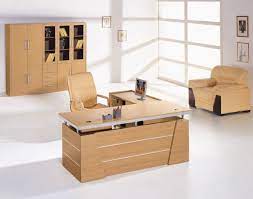
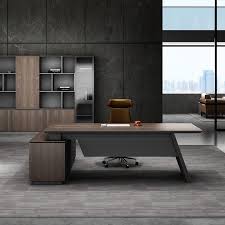
Choose a desk that suits your work style and space. If you need ample surface area, an L-shaped or corner desk might be ideal. If you prefer a minimalist setup, opt for a sleek and compact design. Ensure the desk has built-in cable management to keep wires organized.
Step 5: Technology Integration
Position your computer monitor(s) at eye level to reduce strain on your neck and eyes. Invest in a high-quality keyboard and mouse that are comfortable to use for extended periods. Cable organizers can help keep your workspace tidy and prevent tangling.
Step 6: Storage Solutions
Clutter can hinder productivity. Consider storage solutions such as drawers, shelves, and filing cabinets to keep essential items within reach while maintaining a clean workspace. Use vertical space efficiently to maximize storage.
Step 7: Personalization and Inspiration
Add personal touches to your workstation that inspire and motivate you. This could be artwork, plants, or meaningful objects that create a positive and enjoyable work environment.
Step 8: Connectivity and Gadgets
Ensure you have sufficient power outlets and USB ports for all your devices. Consider investing in a docking station if you frequently connect and disconnect laptops. Cable organizers or clips can prevent a tangled mess.
Step 9: Acoustic Considerations
If your workspace is prone to noise, incorporate acoustic solutions such as sound-absorbing panels or noise-cancelling headphones to create a quiet and focused atmosphere.
Step 10: Regular Maintenance
Keep your workstation organized and clutter-free. Regularly clean your desk, keyboard, and monitor to maintain a tidy and hygienic workspace.
Remember that the ultimate office workstation is a reflection of your needs, preferences, and work habits. As you design your space, prioritize functionality, comfort, and an environment that supports your productivity and well-being. With careful planning and attention to detail, your workstation can become a haven of creativity and efficiency.